
 January 8, 2026
| By
January 8, 2026
| By What a year it’s been for Teams Free! In 2025, we delivered features that make connecting, collaborating, and getting things done easier than ever. Whether you’re chatting with friends, planning a project, or hosting a quick meeting, Teams Free kept evolving to meet your needs. Let’s celebrate the highlights that shaped your experience this year:
January: Start Strong with Video Preview
Kick off your meetings with confidence! Now you can check your camera setup before joining. See what’s new.

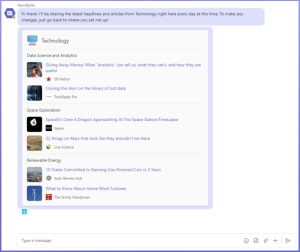
February: Stay Informed with NewsBytes
Your daily dose of updates—right inside Teams. NewsBytes keeps you in the loop without leaving the app. Learn more.
March: Instant Meetings in Group Chats
No scheduling, no hassle—just click and connect. Start a meeting instantly from any group chat. Discover how.

April: Make It Yours
Resize your Teams window for the perfect fit and react with more emojis to keep conversations lively. Explore updates.

May: More Apps, More Possibilities
Expand your toolkit with new apps and bring Skype users into the conversation seamlessly. Check it out.

June: Search Smarter, Download Your Way
Find messages faster with in-chat search and choose where your files land with configurable download folders. Learn more.

July: Accessibility & Privacy Upgrades
Real-Time Text makes meetings more inclusive, and new privacy controls put you in charge. Read more.

August: Connect & Chat Your Way
Locate users by name and enjoy a cleaner, more compact chat experience. See details.

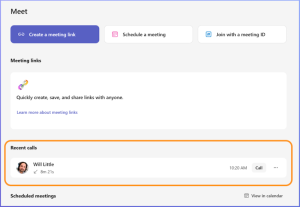
September: Calls Made Simple
Recent calls on desktop and instant meetings on mobile keep you connected wherever you are. Learn more.
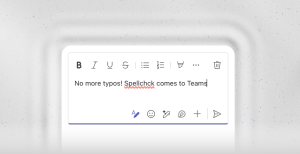
October: Write with Confidence
Spell check in the composer ensures your messages are polished every time. Explore feature.
November: Record & Refine
Capture your meetings and let Copilot help rewrite messages for clarity and impact. Find out more.

Looking Ahead
2025 was packed with innovation—and we’re just getting started. Expect even more ways to connect, create, and collaborate in 2026. Stay tuned and keep exploring Teams Free!
You share, we listen.
We are always grateful to receive your feedback and suggestions to make Teams better.
- Report bugs and glitches by sending us relevant feedback using the in-app form. Please include diagnostic logs and screenshots to help us to investigate your issue. Learn more how to send feedback or suggest a feature in Teams Free
- If you have suggestions for new features or changes to the existing ones, you can vote and submit ideas on Microsoft Teams Free Feedback Portal.
- In Teams Insider Community you can share feedback and engage directly with the product team. You can also join regular calls to hear about upcoming improvements and more. Learn more and join Teams Insider Community